
(Originally posted on Building43, Rackspace’s community website)
Frameworks have become increasingly popular among developers. There’s Rails for Ruby, Blueprint for CSS, and Thesis for WordPress.
Thesis offers a solid foundation for building WordPress sites. It is designed with SEO in mind and provides extensive design controls to handle most theme adjustments without touching code. When you do need to modify the site, changes are concentrated in two files, improving code reusability and making upgrades simpler.
Thesis is used by a number of well-known blogs and authors. Many developers, including myself, prefer building client sites on Thesis because it avoids reinventing the wheel and speeds up development compared to creating a theme from scratch.
Design Options
After installing Thesis, you’ll see two main configuration pages: Thesis Options and Design Options.
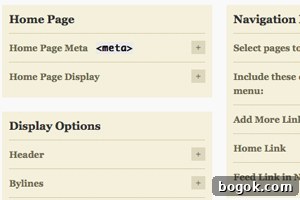
The Thesis Options panel allows you to:
- Set a custom RSS feed, for example when using FeedBurner
- Add header and footer scripts for analytics, trackers, or verification codes
- Control how posts are displayed across the site
- Customize navigation: choose which pages appear, reorder them with drag-and-drop, and enable automatic dropdowns for child pages
- Set default sizes for post images and thumbnails so you don’t need to resize images manually
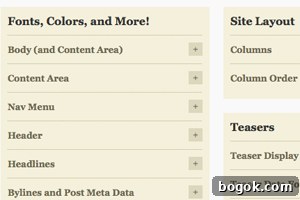
The Design Options panel lets you:
- Choose the number of columns (1, 2, or 3), their pixel widths, and layout arrangement
- Select a page width or full-width layout for headers and footers that span the browser
- Control font families, sizes, and colors for headings, navigation, content, sidebars, and footer
- Configure the Multimedia box (above the sidebars) to display rotating images, a video, custom code, or hide it entirely
Further Customizations
When you need to edit code, use the custom folder. Put CSS changes into custom.css and prefix selectors with the .custom class so your styles override the default ones without altering original files. This keeps changes non-destructive and easy to revert by removing or commenting out the custom rules.
For example, to replace the site title in the header with a logo, upload the image to /wp-content/themes/thesis/custom/images and add CSS like:
.custom #logo {background-image: url('images/logo.gif'); background-repeat: no-repeat; width: 170px; height: 145px; text-indent: -9999px;} .custom #logo a {width: 170px; height: 145px; display: block; outline: none;}
HTML and PHP changes belong in custom_functions.php. Thesis relies on functions and hooks to modify theme behavior instead of editing core template files directly. You create new functions and attach them to Thesis hooks. For instance:
function my_new_function() { echo 'Hello World'; } add_action('thesis_hook_name','my_new_function');
That approach makes it simple to reposition elements or inject content. To move the navigation menu below the header, instead of editing header.php, add these lines to custom_functions.php:
remove_action('thesis_hook_before_header','thesis_nav_menu'); add_action('thesis_hook_after_header','thesis_nav_menu');
To add an extra widget-ready sidebar in the footer for ad placement, you can register a sidebar and hook it into the footer. For example:
register_sidebars(1, array( 'name' => 'Footer Ads', 'before_widget' => '', 'after_widget' => '', 'before_title' => '
', 'after_title' => '
' )); function ads_in_footer(){ dynamic_sidebar('Footer Ads'); } add_action('thesis_hook_footer','ads_in_footer');
Thesis looks polished out of the box but also supports deep customization through the Design Options and the hooks-and-functions system. That combination makes it a powerful choice for developers who want a performant, SEO-friendly WordPress foundation without rebuilding common features from scratch.